Gadget Guide Electronics
ANNKE 3MP WiFi Battery Powered Outdoor Security Camera Two-Way Audio 4mm Lens 2.4Ghz Wi-Fi Indoor Smart Home With Screen Camera
ANNKE 3MP WiFi Battery Powered Outdoor Security Camera Two-Way Audio 4mm Lens 2.4Ghz Wi-Fi Indoor Smart Home With Screen Camera
Couldn't load pickup availability
SPECIFICATIONS
AI Functions: Motion Detection
App name: Other
Audio Output: Two Way Audio
Brand Name: ANNKE
Color Night Vision: No
Connectivity: WIFI(Dual-Band)
High Definition: 3.0 Megapixels
Hign-concerned Chemical: None
Installation: Normal
Lens (mm): 4mm
Lens Quantity: Single Lens
Megapixels: 3 MP
Movement Range(Pan): Other
Origin: Mainland China
Power Mode: Battery Powered
Power Supply: Normal
Rechargeable Battery: Built in
Rechargeable Battery Capability: Other
Scene: Indoor
Sensor: CMOS
Style: PT Camera
Supported Mobile Systems: Android,iOS
Supported Operating Systems: No
Zoom: None
Zoom type: None
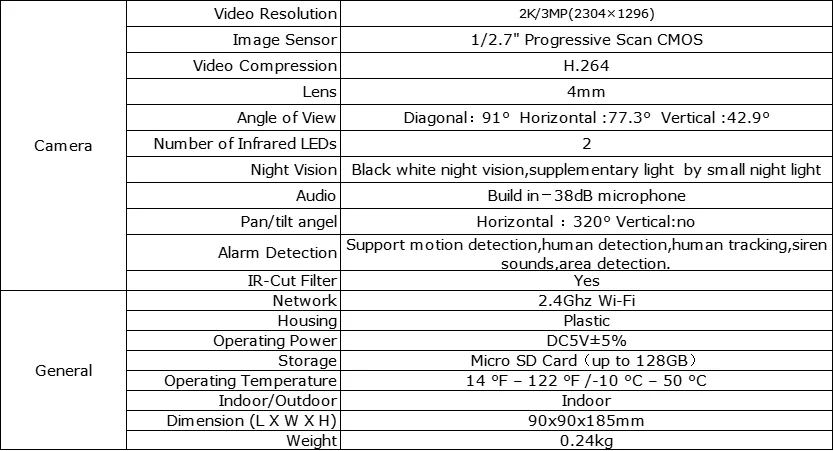
★ 2K HD image
★ IPS 2.4-inch HD screen
★ One-touch video call, close the distance with family members, face-to-face interaction and communication
★ Video automatically connected, family members do not need other operations, direct video call
★ Two-way video/two-way voice
★ Support motion and human detection
★ Support custom area alarm
★ Support timed detection mode
★ Human tracking
★ Warm atmosphere night light
★ Built-in removable battery, support power-off battery life assistance
★ High-precision gimbal motor, only supports horizontal rotation angle of 320°
★ 2 high-efficiency infrared lights, infrared night vision distance up to 6 meters
★ Support cloud storage and local storage, Micro SD Card can support up to 128GB
★ Support multi-person sharing

 Q: Turn on the battery switch but the device won’t turn on?
A: The battery is low, plug it in and wait 3-5 minutes for charging.
Q: The battery switch is constantly on and the battery is depleted, but the device won’t turn on when plugged in?
A: Turn the battery switch off and plug it in to turn it on.Or turn on the battery switch, plug it in and wait 3-5 minutes, or even longer, to charge and turn on the device.
Q: How to charge the battery?
A: Turn the battery switch to on and plug it in to charge. If the battery switch is turned off, the device can be turned on but cannot be charged when plugged in.